HOST GUIDE

EVERYTHING YOU CAN DO AS A HOST

From launching a 60-second ready-made game to running Squads with custom arenas, Hall of Fame boards, host-signed certificates, and your own host profile.

CHAPTER 01

QUICK START

You can host a live battle in under a minute — either with one of the 32 ready-made quizzes (no account needed) or with your own quizzes from the Host Dashboard.

STEP 1

PICK A QUIZ & MODE

Choose any ready-made quiz or one of your own. Play Solo or split the room into 2, 3, or 4 teams.

STEP 2

SHARE THE BIG SCREEN

Put the host screen on a TV, monitor, or video call. Players scan the QR code or type the 6-digit code on any phone or laptop — no app or login required.

STEP 3

START & PULL

Every answer moves the rope live. After the final question, the podium and individual highlights appear automatically.
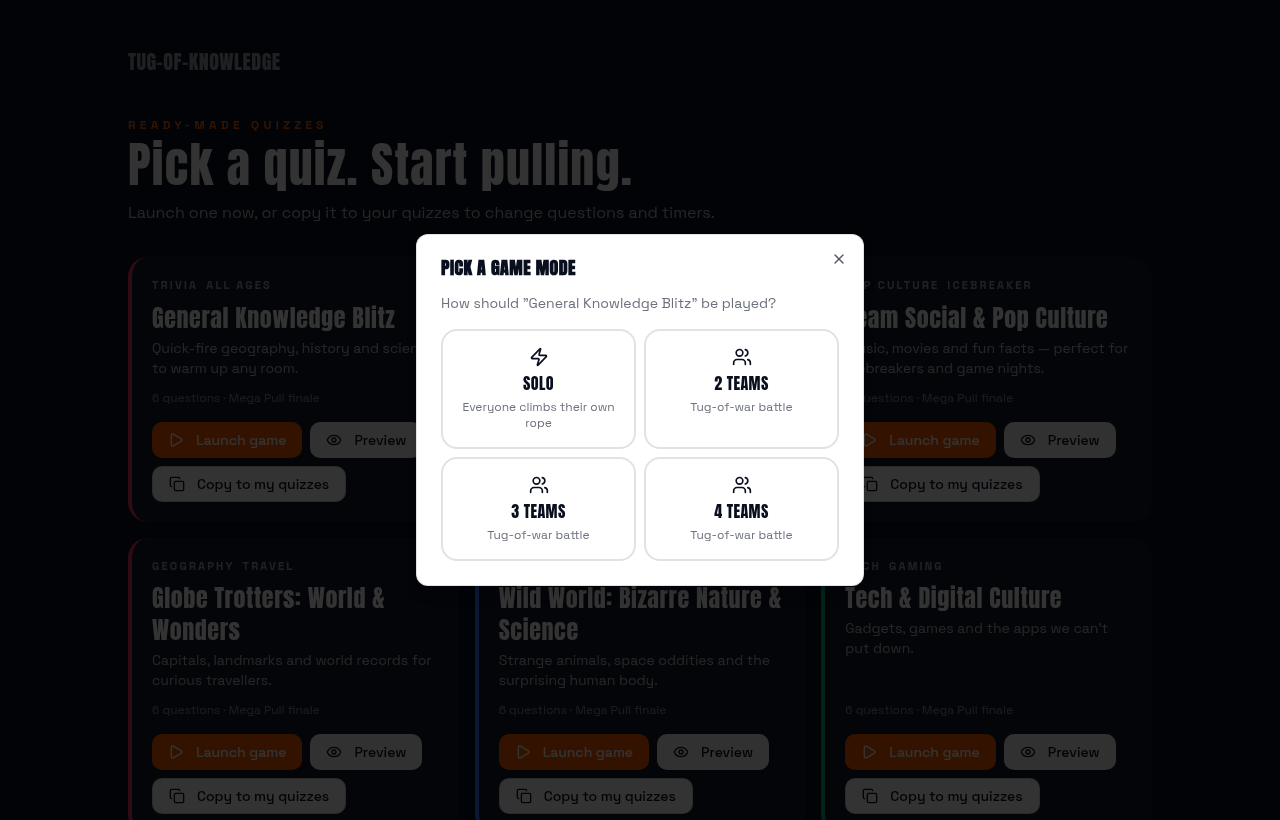
Ready-made quiz library with the Pick a Game Mode dialog open
Launching a ready-made quiz lets you pick Solo or 2–4 teams every time you play.
  1. 1Solo Rope ClimbFree-for-all mode where every player climbs their own rope toward the summit bell.
  2. 22, 3 or 4 TeamsTeam Tug-of-War — classic horizontal rope for 2 teams, or Compass Arena for 3–4 teams.
  3. 3Copy to my quizzesSigned-in hosts can duplicate any starter deck to edit questions, timers, or images.

COMPARE GAME MODES

RED LEADSBLUE

Red vs. Blue pull a straight rope. A flag marker drifts toward the leading side after every round.

CHAPTER 02

BUILDING & IMPORTING QUIZZES

From your dashboard, build quizzes from scratch, organize them into folders, duplicate existing decks, or import up to 100 questions at once from Excel or CSV.
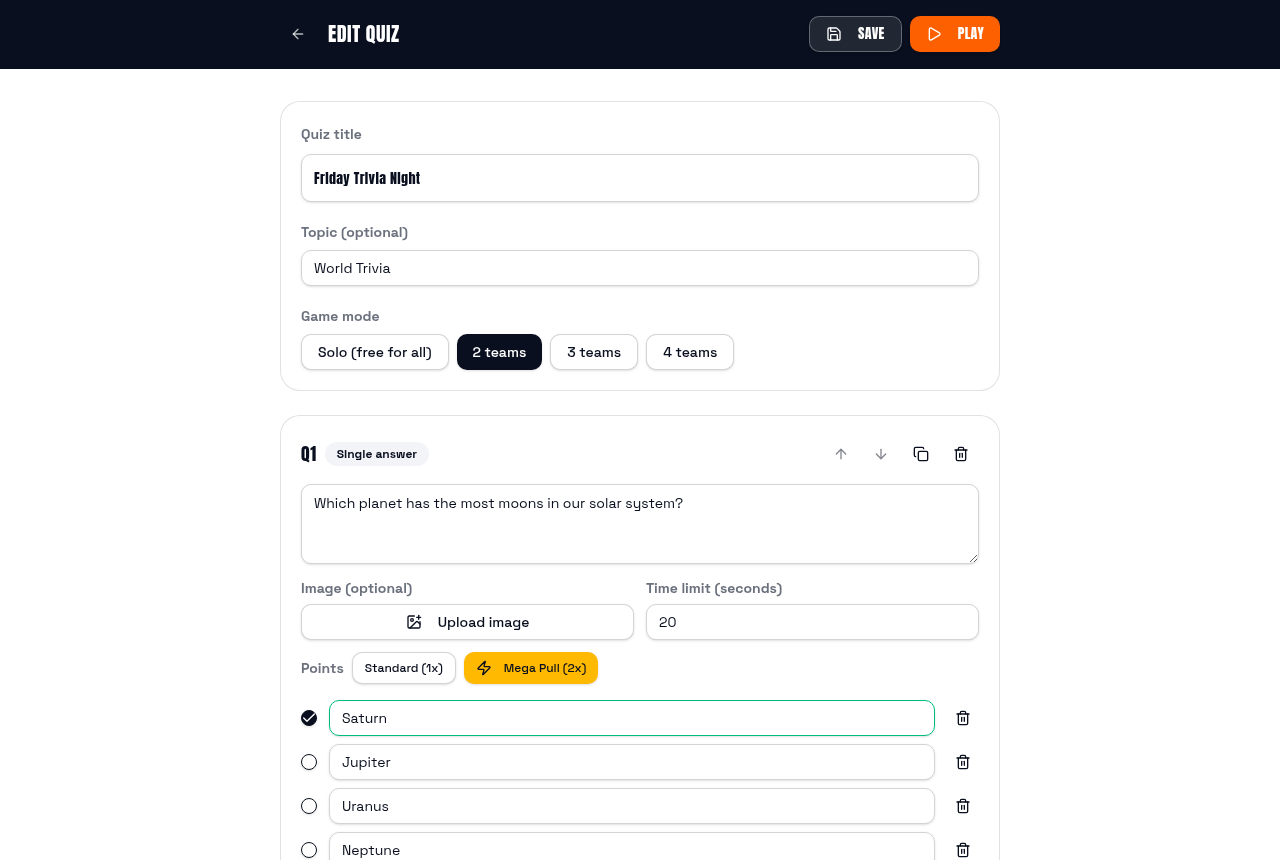
  • Three question types: Single answer, Multiple answers (partial credit when no wrong option is picked), and True / False.
  • Answer shuffle: Each player's device sees options in a different order automatically so nobody can copy a neighbour.
  • Images, timers & Mega Pull: Attach a picture to any question, set a custom countdown, or flip on Mega Pull (2×) for double-point finales.
  • Folders & topics: Group quizzes in folders on your dashboard, and set an optional Topic to unlock topic mastery tracking for Squad members.
Quiz editor showing title, optional topic, game mode selector, question text, image upload, time limit, and Mega Pull toggle
The Quiz Editor gives you full control over each question's type, image, timer, and point multiplier.
  1. 1Optional TopicTag a quiz with a subject so Squad member reports group accuracy by topic.
  2. 2Default Game ModeSet whether this quiz launches as Solo or 2, 3, or 4 teams.
  3. 3Image & Time LimitUpload a picture shown on both the big screen and players' devices, and set seconds per round.
  4. 4Mega Pull (2×)Double every point on that question to keep comebacks alive until the last round.
  5. 5Save & PlaySave your changes, then click PLAY to pick a Quick Match or a Squad.
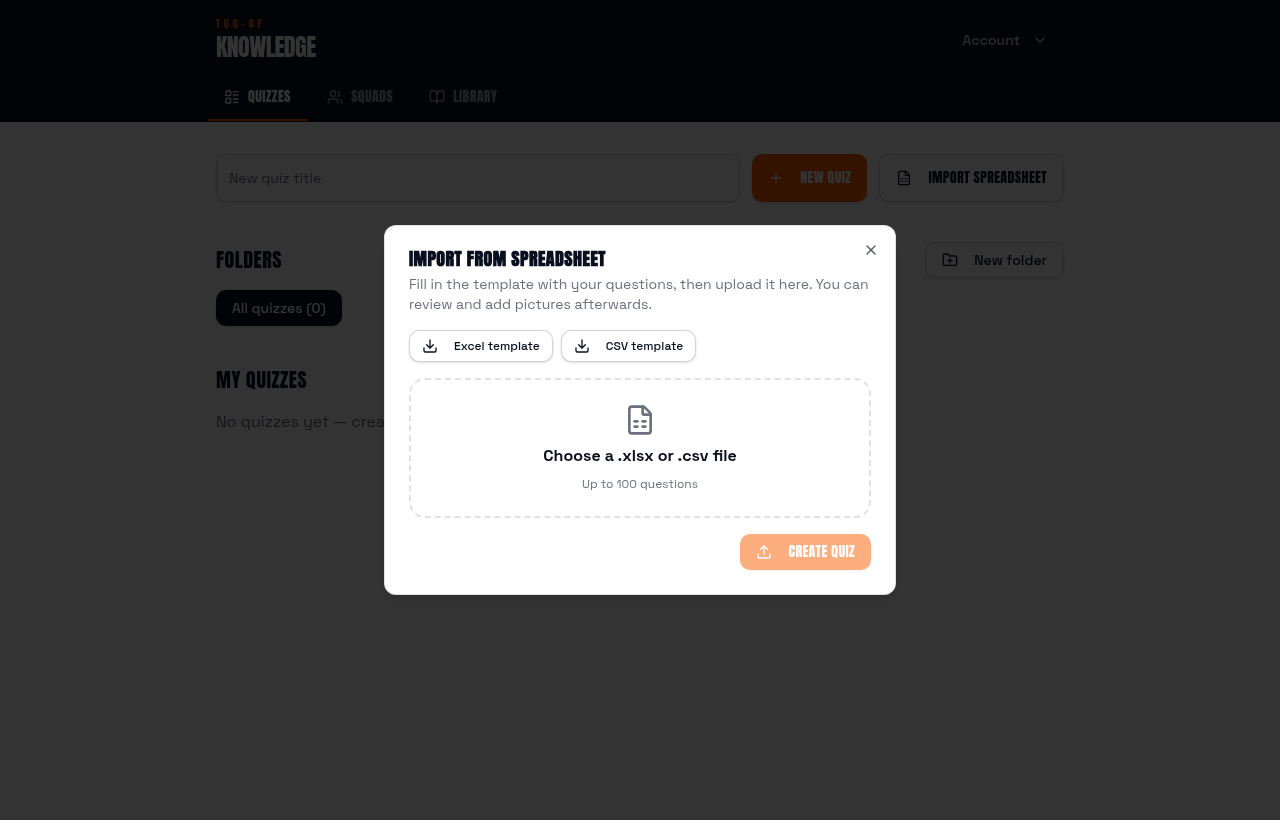
Import from Spreadsheet dialog showing Excel and CSV templates and the file upload box
Already have questions in a sheet? Download the template and import up to 100 questions in seconds.
  1. 1Excel & CSV TemplatesDownload the ready-formatted .xlsx or .csv template with sample rows and valid column headers.
  2. 2Instant Row ValidationUpload your file to preview every question; any missing answers or typos are flagged by row before creating the quiz.

CHAPTER 03

RUNNING A LIVE GAME

While players gather in the lobby, they can pick a hat on their device and send up to two lobby cheers. You control the pace from start to finish.
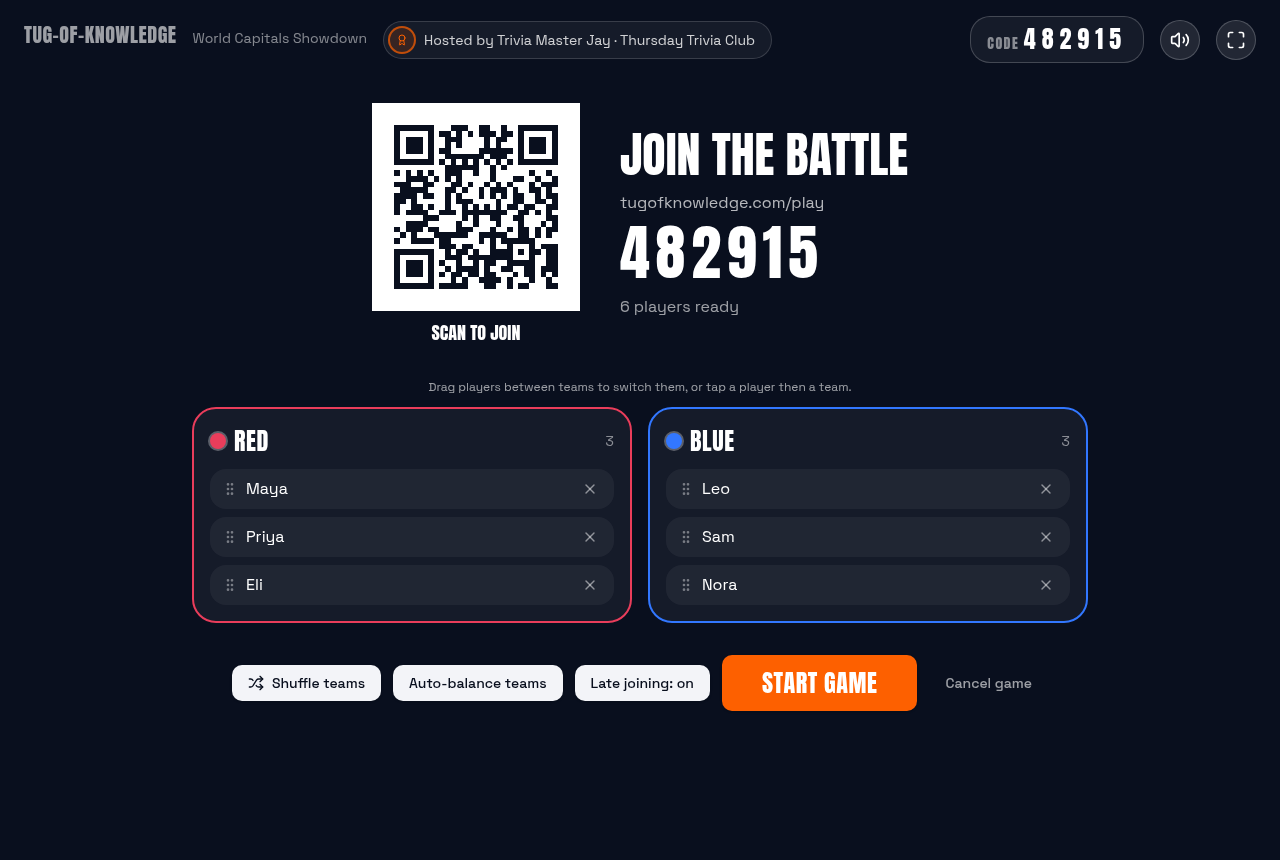
Live game lobby showing host badge, QR code, 6-digit code, drag-and-drop Red and Blue team rosters, Shuffle teams, Auto-balance, Late joining toggle, Start Game, and Cancel game
Lobby controls before the first question opens.
  1. 1Host Identity BadgeYour display name, organization, and crest from Profile & settings appear here and on players' waiting screens.
  2. 2QR & 6-Digit CodePlayers scan with their camera or enter the code at tugofknowledge.com/play. Duplicate names are blocked automatically.
  3. 3Drag-and-Drop Teams & Auto-CleanDrag a player onto another team to move them (or tap a player then a team on touchscreens), or click × to remove them. Players who close their page before start drop off automatically after ~12 seconds.
  4. 4Shuffle, Auto-Balance & Late JoiningRemix everyone into equal teams with one click, and toggle late joining on or off so stragglers can join mid-game without skewing team averages.
  5. 5Cancel GameNeed to call it off before starting? Cancel the lobby anytime — players immediately see a clear game-cancelled screen.
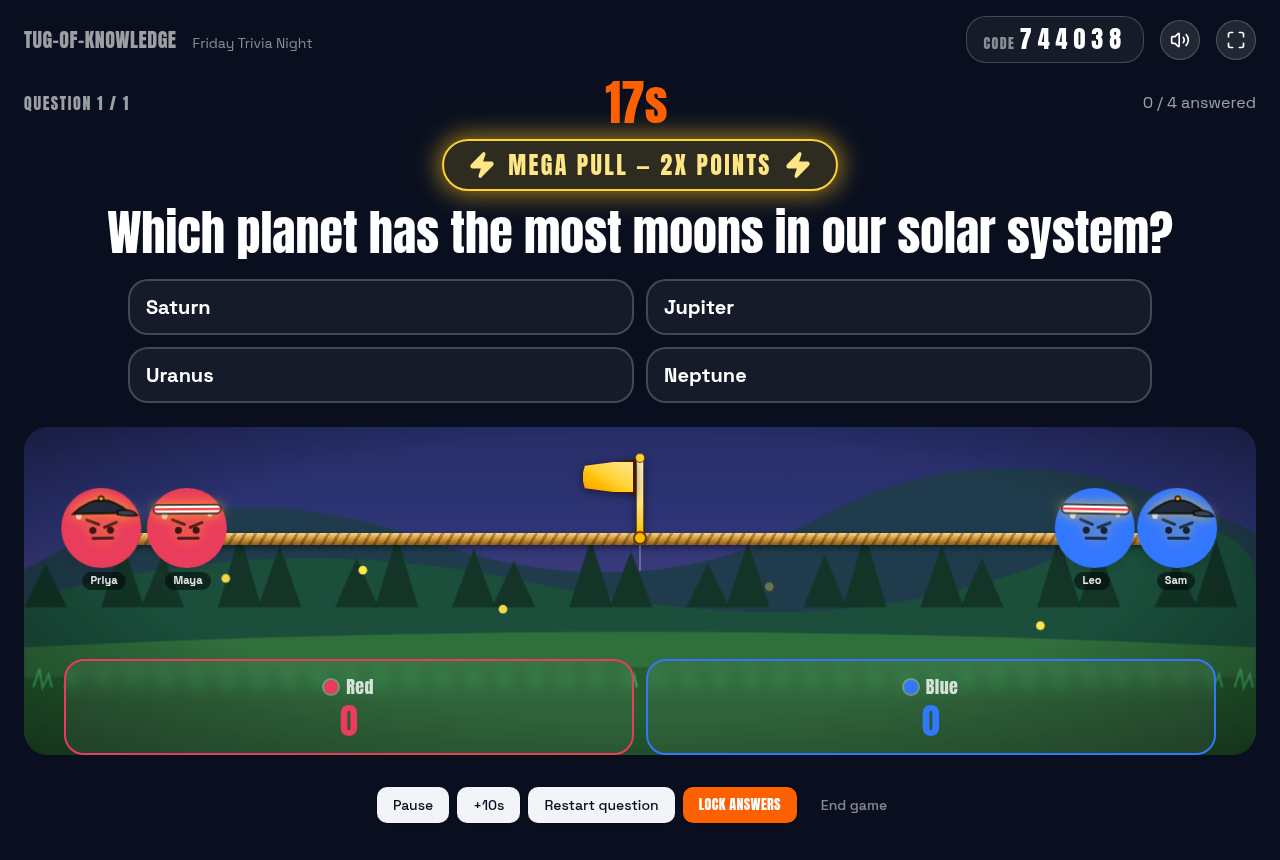
Live big-screen battle with countdown timer, Mega Pull banner, question, choices, tug-of-war arena with players wearing hats, team scores, and host controls
During a question, players tap answers on their device while the big screen tracks the countdown and pulls the rope.
  1. 1Live Timer & Mega Pull BannerShows remaining seconds and how many players have answered. Sound effects and music can be muted from the top-right bar.
  2. 2Animated Arena & HeadgearPlayers appear on the rope wearing their chosen hats, with live reaction floats and squad-unlocked ropes and backdrops.
  3. 3Live Host ControlsPause the clock, add +10s, restart a question if needed, or click LOCK ANSWERS to score early once everyone is in.

CHAPTER 04

HOW SCORING WORKS

Scoring rewards both speed and accuracy while keeping uneven team sizes and latecomers completely fair.

SPEED POINTS

100 TO 1,000 PER QUESTION

Instant right answers earn 1,000 pts, scaling smoothly down to a 100 pt floor right before time runs out — so a last-second correct tap always counts. Wrong answers score 0. On a Mega Pull (2×) round, every point doubles.

MULTI-ANSWER PARTIAL CREDIT

NO PENALTY UNLESS WRONG

On multiple-answer questions, selecting 2 of 3 right answers earns 2/3 of the speed points — as long as no wrong option is picked. Picking any wrong option wipes that question to 0.

FAIR TEAM AVERAGING & BONUS

POINTS ÷ ROSTER + 500 BONUS

Each round's team score is the average across active players on that team, so a 4-person team can beat a 6-person team fairly. If every active player on a team gets the question 100% right, they earn a +500 Perfect Team bonus.

LATE JOINERS & SOLO AWARDS

FAIR FROM ANY ROUND

Late joiners wait out the open question and start on the next one — they are excluded from the current round's team average, and in Solo mode they start from 0 pts. At the finish, Solo games also crown Fastest Hands, Iron Grip (longest streak), and Big Comeback beside the podium.

CHAPTER 05

SQUADS, MEMBERS & REWARDS

Host the same group every week? Create a Squad and select it whenever you click PLAY. Every 50 points scored across all players hauls the squad 1 metre further — in both Team Tug-of-War and Solo Rope Climb — unlocking arenas, ropes, and hats across 10 ranks.

RANK 1 OF 10 · 0 M

ROOKIES

Classic rope, village green & the nine starter hatsNew rope: Classic ropeNew arena: Village green

SQUADS HUB & COMMAND CENTER

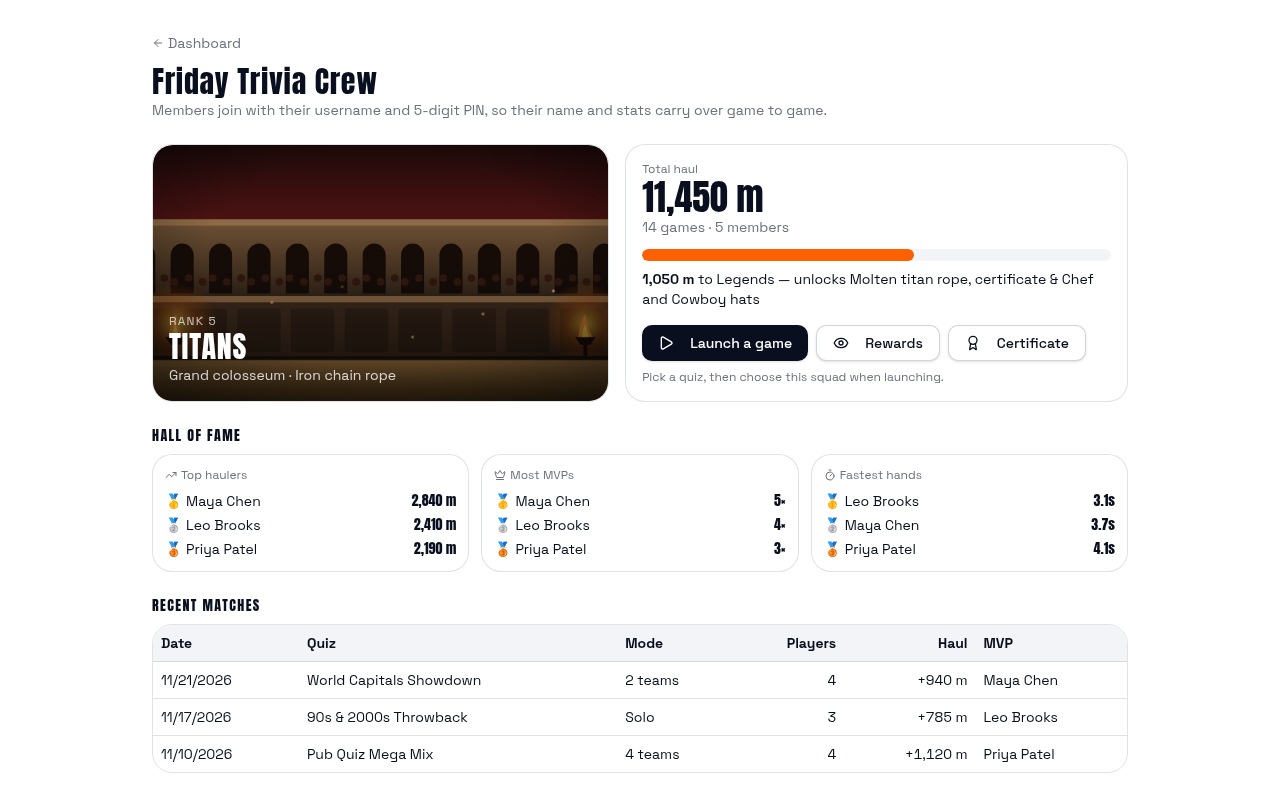
Your Squads tab totals every metre and game across all your groups and adds a Squad Standings leaderboard whenever you run two or more Squads. Click any Squad's name to open its Command Center with its active arena and rope showcase, Hall of Fame, Recent Matches log, and member roster.
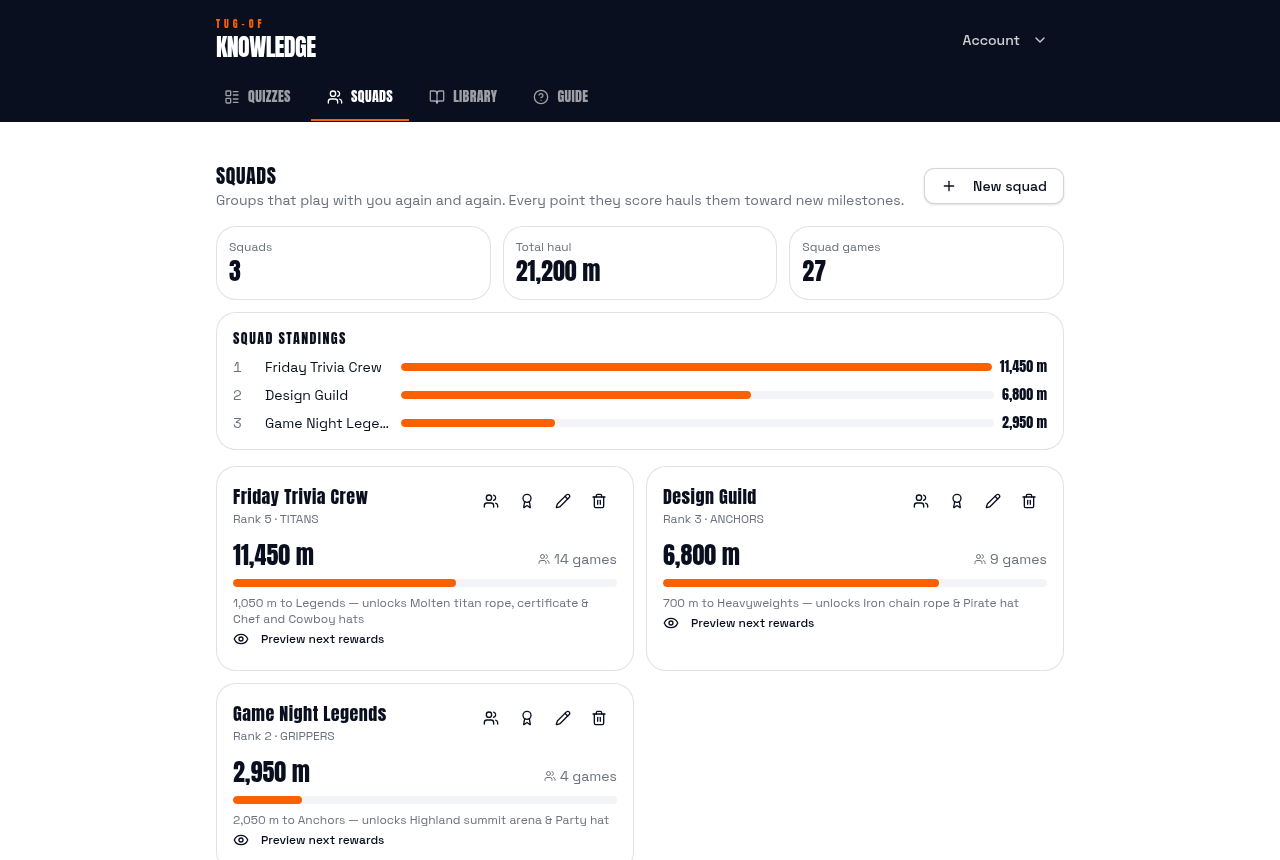
Squads hub showing all-time totals bar, Squad Standings leaderboard, and individual squad cards with rank progress
Compare all of your recurring groups from the Squads tab, then click any squad name to open its Command Center.
  1. 1All-Time TotalsShows your total Squads, combined metres hauled, and lifetime Squad games at a glance.
  2. 2Squad StandingsAppears automatically with 2+ Squads, ranking every group by haul distance with proportional bars.
  3. 3Squad Cards & Quick ActionsClick a Squad name to open its Command Center, preview upcoming rewards, or jump straight to its certificate.
Squad Command Center showing rank and arena showcase banner, total haul progress, Launch, Rewards, and Certificate buttons, Hall of Fame, and Recent Matches table
Each Squad has its own Command Center with live rank visuals, Hall of Fame podiums, and match history.
  1. 1Rank & Arena ShowcaseDisplays the Squad's current rank alongside its unlocked arena backdrop and rope skin.
  2. 2Haul Progress, Rewards & CertificateTrack distance to the next unlock, preview rewards, launch a game, or print a Squad certificate signed with your host name and crest.
  3. 3Hall of FameHighlights the Squad's Top haulers, Most MVPs, and Fastest hands (after at least 5 answered questions).
  4. 4Recent MatchesLists the last 8 finished Squad games with date, quiz, mode, player count, haul added, and MVP.

MEMBER LOGINS & PROGRESS REPORTS

Add regular players to a Squad to give each person a simple username + 5-digit PIN — no email address needed. When they choose Squad member on the join screen, their games, metres, accuracy trend, answer speed, confidence breakdown (Quick & right, Slow but right, Quick but wrong, Slow & wrong), and topic mastery all track automatically. Printed progress sheets carry your Hosted by line, and Squad & member certificates include your host signature and crest.
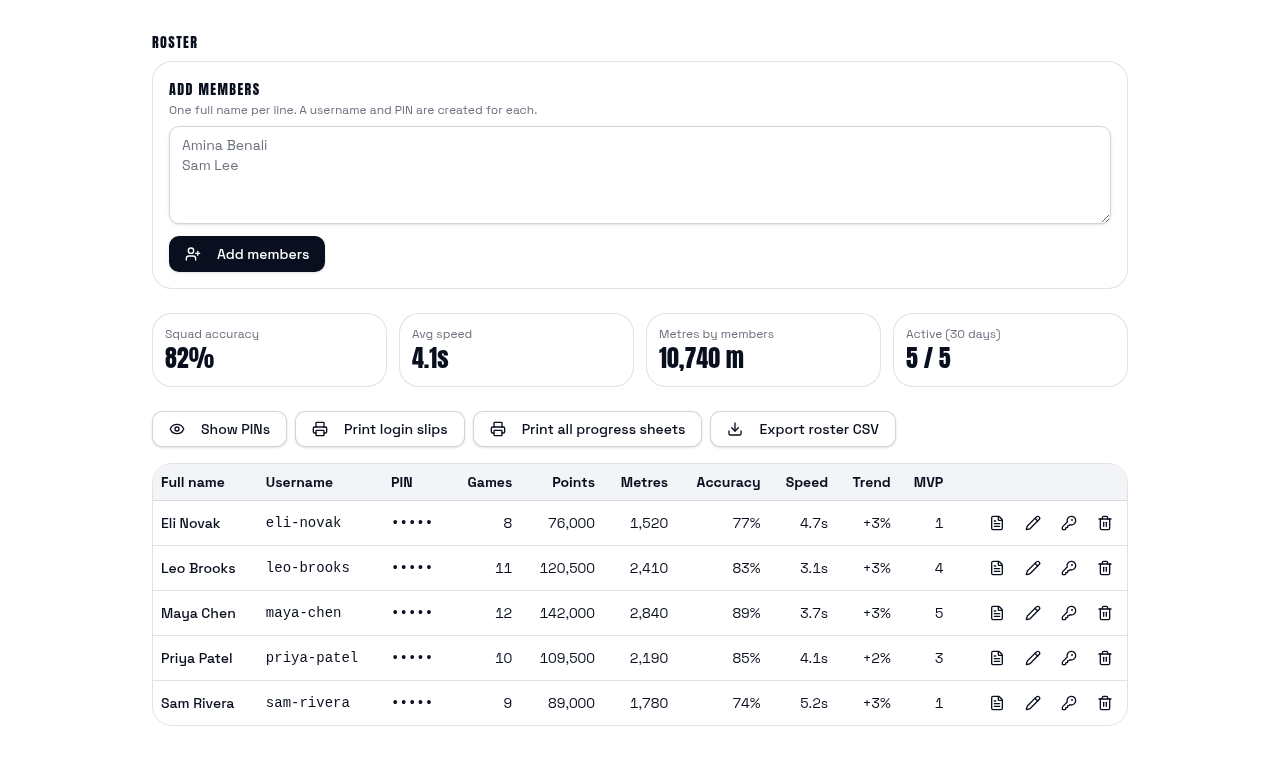
Squad member roster showing bulk add names box, Squad pulse metrics, Show PINs, print login slips, print progress sheets, CSV export, and member table
Manage every Squad member's PIN, printable slips, progress sheets, and CSV exports from one screen.
  1. 1Bulk Add MembersPaste one full name per line. Usernames and 5-digit PINs are created for each person instantly.
  2. 2Squad PulseSee overall Squad accuracy, average response speed, total metres hauled by members, and 30-day activity.
  3. 3PINs, Signed Sheets & CSV ExportToggle PIN visibility, print cut-out login slips, print host-branded progress sheets for everyone, or export a roster CSV.
  4. 4Individual Report & Signed CertificateClick the report icon beside any member for their game log, confidence breakdown, topic mastery, and printable certificate signed by you.

CHAPTER 06

HOST PROFILE & SETTINGS

Open Account → Profile & settings from your dashboard to customize how players see you, set launch defaults for new games, and manage your account.

  • Host identity everywhere: Your display name, organization, and crest appear in game lobbies, on players' waiting screens, as the signature on certificates, and on printed progress sheets.
  • Launch defaults: Pre-select your preferred game mode, whether late joining starts on or off, and whether the big screen opens muted. You can still override them per game.
  • Protected account controls: Change your password anytime. Deleting your account lives only here and requires typing DELETE (plus your password for email accounts) to prevent accidents.
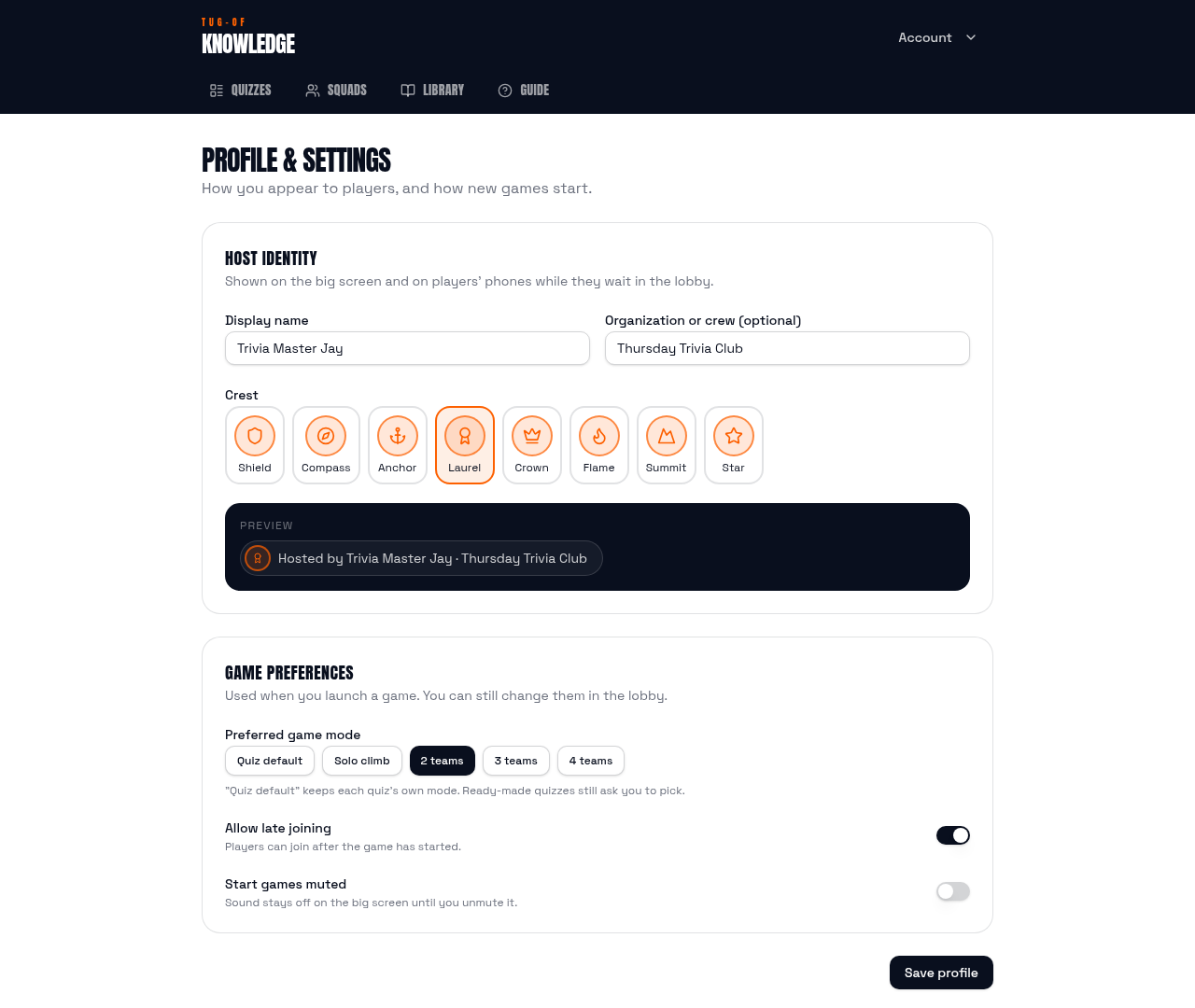
Profile and settings screen showing Host Identity fields, crest picker, live badge preview, Game Preferences, and Save profile button
Customize your host badge, crest, and default game options in Profile & settings.
  1. 1Display Name & OrganizationAppears on the big screen lobby, players' waiting screens, progress sheets, and certificate signatures.
  2. 2Host Crest & Live PreviewChoose from 8 crests and preview your exact badge before saving.
  3. 3Default Game PreferencesSet your go-to game mode, default late-joining switch, and whether new games start muted.
  4. 4Save ProfileNew games adopt your saved defaults right away; certificates and progress sheets always use your live profile.

READY TO RUN ONE?

PUT IT ON THE BIG SCREEN

Launch one of the 32 ready-made quizzes in seconds, or head to your quizzes to build your own.